Changelog

0.1.45

Tags, and five new languages.

Finder tags arrive everywhere — sidebar, files, and the right-click menu — and SADFinder now speaks German, French, Spanish, Italian, and Portuguese.

New Improved Fixed

Changes in version 0.1.45

  • New

    Finder tags, on by default: a Tags section in the sidebar, colored dots on files, and tag commands in the right-click menu. Tags are macOS's own — anything set here shows up in Finder, and the other way round.

  • New

    SADFinder now speaks German, French, Spanish, Italian, and Portuguese, with an in-app language setting.

  • Improved

    The emergency kill switch (Cmd+Opt+Shift+K) now names everything it switched off.

  • Fixed

    The drag badge counts files again instead of pasteboard entries.

0.1.43

Finder hand-offs, now seamless.

Open or reveal an item from another app and SADFinder picks it up immediately, without duplicate windows, icon flicker, or a detour through the wrong folder.

New Improved Fixed

Changes in version 0.1.43

  • Fixed

    “Open in Finder” and “Show in Finder” from other apps now land directly on the requested item in SADFinder.

  • Improved

    Finder hand-offs feel instant, keep the same window position, and reuse the right SADFinder window instead of opening duplicates.

  • Fixed

    Large, media-heavy, and app-heavy folders settle smoothly without waves of flickering icons.

  • Fixed

    Broken videos no longer leave thumbnails pulsing or hold up the rest of the folder.

  • Improved

    Finder replacement now covers external drives, and revealing an app selects it instead of opening its contents.

  • Improved

    Trial status now refreshes daily while a trial is active.

0.1.33

More personal. More readable.

Tabs are easier to tell apart, visual preferences live in one clear place, and every label can be made easier to read. Keyboard control, performance, and setup received a careful pass too.

New Improved Fixed
New 01

Three ways to color your tabs.

When several tabs are open, each folder can have its own color. Choose a subtle dot, a precise underline, a full background tint, or turn tab colors off in Preferences → Appearance.

01
Colored dotA compact color cue that keeps every tab surface quiet.
Three SADFinder tabs open for Brand Assets, Campaigns, and Product Screens, each marked with a different colored dot
02
UnderlineA clear color line gives each open location its own identity.
Three SADFinder tabs open for Brand Assets, Campaigns, and Product Screens, each marked with a different colored underline
03
Background tintThe strongest distinction, with the active tab tinted edge to edge.
Three SADFinder tabs open for Brand Assets, Campaigns, and Product Screens, each using a different background tint
New 02

Appearance, all in one place.

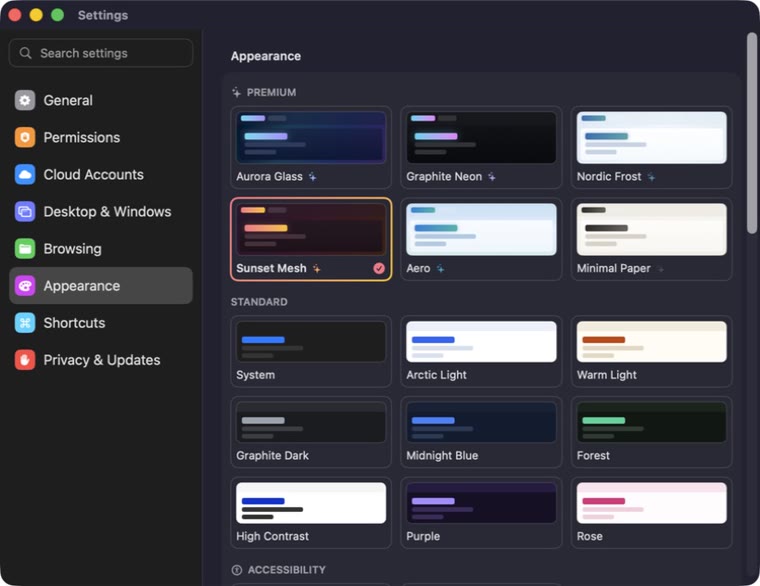
The new Preferences → Appearance panel makes themes, tab colors, and readability options easier to find and understand.

New 17 built-in looks

Six new premium themes.

Richer glass, color, contrast, and two quieter light options.

  • Aurora Glass
  • Graphite Neon
  • Nordic Frost
  • Sunset Mesh
  • Aero
  • Minimal Paper
SADFinder Preferences open to Appearance, showing six premium themes above the standard themes
Improved 85–200% content scale

Large Text means every label.

File names, sidebar items, tabs, path controls, buttons, and status labels are easier to read. Large Text is available in light and dark.

  • All interface labels scale together
  • Light and dark variants
  • Content scaling up to 200%
SADFinder in Large Text mode with larger labels in the sidebar, tabs, toolbar, path bar, file grid, and status bar
New 03

Useful every day.

Small-looking additions that remove repeated steps from file work.

New

Connect to Server

Find shared folders and servers on your local network, then reconnect quickly.

New

Move to Folder

Choose where files go, follow progress, and undo the move if needed.

Improved

Remember folder views

Each folder remembers its sorting, grouping, and folder-size setting.

New

Shortcut guide

Press ? to see the complete SADFinder keyboard-shortcut guide.

Refinements

Faster, clearer, more reliable.

7 changes
  • Fixed

    Backspace now deletes characters while you rename an item instead of navigating to the parent folder.

  • Fixed

    ⌃⌘T opens the current folder in Terminal, matching the shortcut guide.

  • Improved

    Current Folder search now explains that subfolders are included.

  • Improved

    Folders with thousands of files open and switch noticeably faster in List view.

  • Fixed

    Opening a file no longer freezes SADFinder while a slow application launches.

  • Improved

    Full Disk Access setup adds a Relaunch action and warns when SADFinder runs from the downloaded disk image.

  • Improved

    Crash reporting no longer mistakes open menus and save dialogs for a frozen app.